AI Drafting Professional Letters in Minutes, Not Hours
AI Drafting works with the documents and data you've already collected.
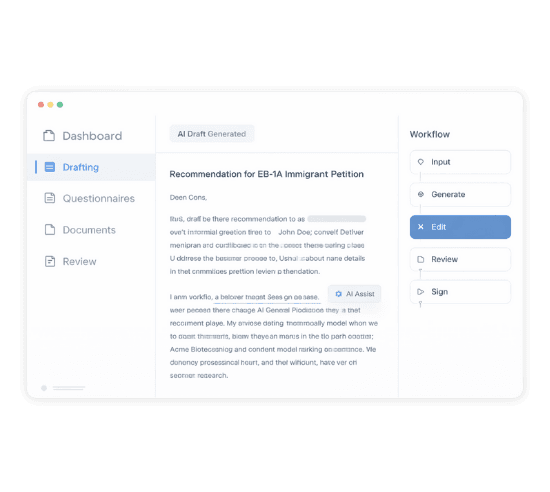
Problem
Drafting immigration letters is time-consuming. Each case needs multiple letters: recommendation letters from different people, support letters addressing specific criteria, cover letters summarizing the entire application. And when you get an RFE, you're starting from scratch under deadline pressure. LegalBridge AI drafts high-quality letters in minutes. Feed it the right information, and it produces drafts that match your firm's style. Your attorneys review and refine instead of writing from blank pages.

How It Works
Input
Complete letter-specific questionnaire and upload supporting documents


Generate
AI drafts the letter in 30 seconds to a few minutes
Edit
Attorney refines the draft using the built-in editor


Review
Share with client for review and approval; then send to recommender for signature
Features
1. Comprehensive Letter Types
AI drafting for every letter your immigration cases require, tailored to specific visa types.
EB-1A & O-1 Visa Letters | H-1B Visa Letters | Other Visa Types |
|---|---|---|
|
|
|
2. Firm-Specific Templates
Your letters should sound like your firm, not generic AI output. Upload your existing letters as templates, and AI will match your style.
How It Works
Upload your template: Drop in a letter your firm has used before
AI learns your style: The system uses your template to structure new drafts
Consistent output: New letters match your firm's tone and formatting
3. Fast Generation
Most drafts generate in 30 seconds to 1 minute. Complex letters with extensive documentation may take up to 20-30 minutes, but you're still saving hours compared to writing from scratch.
If a draft ever fails to generate, our team is notified immediately and investigates right away.
4. Letter-Specific Questionnaires
Good letters require good inputs. We've built targeted questionnaires for each letter type to collect exactly what the AI needs.
Available Inputs
Letter drafting questionnaires: Pre-built for each letter type
Supporting documents: Upload documents that inform the letter content
Recommender information: Details about the recommender and their relationship to the beneficiary
5. Built-In Editor with AI Assistance
AI gets you a strong first draft. The built-in editor helps you refine it.
Editing Capabilities
Full text editing: Edit any part of the draft directly
AI-assisted modifications: Select a section and give instructions on how to change it
Full regeneration: If the first draft isn't right, update the questionnaire and regenerate
6. Recommendation Letter Workflow
Recommendation letters have a unique workflow. LegalBridge handles the entire process from draft to signature.
The Complete Flow
Complete questionnaire with recommender details and supporting documents
AI generates the recommendation letter draft
Attorney reviews and refines the draft
Share with beneficiary/petitioner for review and approval
Once approved, send to recommender via public link
Recommender reviews, edits if needed, and e-signs
Key Capabilities
Multiple letters per case: Generate as many recommendation letters as you need
Known vs. unknown recommenders: Flexibility to draft letters from people the client knows personally or professional contacts
No login required for recommenders: Recommenders access via a public link, making it easy for busy professionals to review and sign
7. RFE Response Drafting
When you receive an RFE, time is critical. LegalBridge helps you respond efficiently.
The RFE Response Flow
Upload the RFE to the platform
AI analyzes the RFE and identifies required documents
Organize your response documents as exhibits
AI drafts the RFE response cover letter with exhibit references
8. Criteria-Specific Drafting
For EB-1A and O-1 cases, letters need to address specific USCIS criteria. The AI understands this.
Criteria-Focused Letters
Original Contribution: Letters specifically addressing the original contribution criterion
Critical Role: Letters demonstrating critical or leading roles in distinguished organizations
Other criteria: Award confirmations, judging confirmations, advisory opinions all tailored to specific criteria
9. Review & Approval Workflow
Letters go through proper review before they're finalized. No shortcuts on quality.
The Review Process
Attorney review: Attorneys verify facts and refine the draft before sharing
Client review: Beneficiaries and petitioners review and add comments through the portal
Approval tracking: See which letters are pending review vs. approved
Recommender review: Once clients approve, recommenders can review, edit, and sign
10. Export Options
Letters are editable in the platform and downloadable in standard formats.
Available Formats
In-platform editing: Edit directly in LegalBridge
Word document: Download for additional editing or firm templates
PDF: Download finalized letters for filing
11. Quality Safeguards
AI drafts are high quality, but they're still drafts. LegalBridge builds in safeguards.
Built-In Quality Controls
Fact-grounded drafts: AI is designed not to exaggerate beyond what's in the questionnaire and documents
Complete questionnaires: Thorough input questions help ensure accurate output
Attorney verification: Attorneys are expected to review all drafts for accuracy before sharing with clients
Multi-stage review: The review workflow ensures multiple eyes see each letter before filing
Connects to Your Entire Workflow
AI Drafting works with the documents and data you've already collected.
Connects To | How |
|---|---|
Documents | Case documents inform letter content |
Questionnaires | Letter drafting questionnaires collect targeted information |
Client Portal | Clients review and approve drafts through their portal |
Exhibits | RFE response letters reference exhibit numbers from your case assembly |
AI Evaluation | RFE evaluation identifies needed documents; drafting creates the response letter |
Why LegalBridge?
Writing letters from scratch for every case
Generic AI output that doesn't match your style
Emailing drafts back and forth for review
Chasing recommenders for signatures
Scrambling to respond to RFEs under deadline
With LegalBridge
AI drafts in under a minute
Use your existing letters as templates
Built-in review and approval workflow
Public link for easy review and e-signature
AI analyzes RFE and drafts response cover letter
Security & Compliance

SOC 2 compliance
Type I and Type II certification in progress

Data encryption
All data encrypted on AWS servers

Expert insights
Available for law firms to enable for their team
FAQs
We’ve Got the Answers You’re Looking For
Quick answers to your questions.
How does AI drafting learn my firm's writing style?
How much time does AI drafting actually save?
What's included in exhibit assembly automation?
What's the typical ROI timeline?
What security measures protect client information?
Can I use the platform for both USCIS filings and consular processing?
Does the platform work for international clients?
What visa categories does the platform support?
Does LegalBridge integrate with accounting or time tracking systems?