Team & Firm Settings Manage Your Team, Brand Your Platform, Connect Your Tools

Manage Your Team, Brand Your Platform, Connect Your Tools
Problem

As law firms grow, managing who has access to what becomes complicated. You need attorneys focused on cases, paralegals handling documents, and admins managing billing. But most platforms are all-or-nothing: either everyone sees everything, or you're constantly managing permissions manually.

LegalBridge gives you granular control over team access, lets you brand the platform as your own, and connects to the tools you already use.

Feature Details

Feature Details

Team & Firm Management

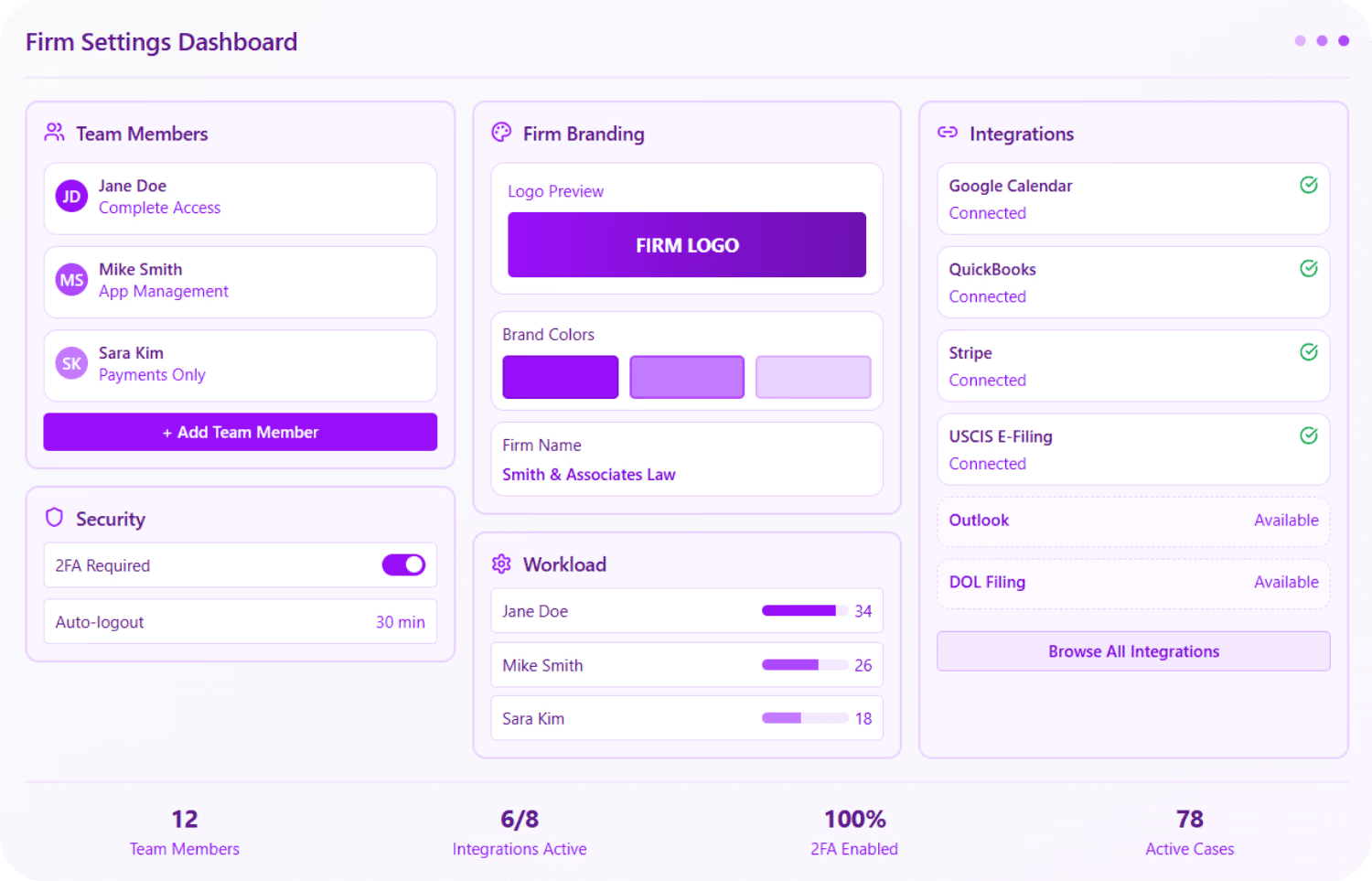
This section focuses on optimizing team workflows and standardizing firm operations. It allows admins to manage case assignments and workload visibility while ensuring consistency through firm-wide templates for documents, retainers, and questionnaires.
Team Management

Workload Visibility

Firm Branding

Firm-Wide Defaults

Admins can set up templates, checklists, and other defaults that apply across the firm.

Configurable Defaults
  • Document checklists: Default checklists per visa type

  • Retainer templates: Standard retainer agreements

  • Letter templates: Firm-specific letter styles for AI drafting

  • Questionnaire customizations: Modified questionnaires with firm-specific sections

Some settings apply across the organization, while others can be customized per user.


Firm Dashboard

Case Assignment

Team Management

Workload Visibility

Firm Branding

Firm-Wide Defaults

Admins can set up templates, checklists, and other defaults that apply across the firm.

Configurable Defaults
  • Document checklists: Default checklists per visa type

  • Retainer templates: Standard retainer agreements

  • Letter templates: Firm-specific letter styles for AI drafting

  • Questionnaire customizations: Modified questionnaires with firm-specific sections

Some settings apply across the organization, while others can be customized per user.


Firm Dashboard

Case Assignment

Access & Security

Control who has access and protect your firm's data.

Security Features
  • Two-factor authentication: Users can set up 2FA individually; firms can make it mandatory

  • Deactivate users: Admins can mark team members as inactive, immediately revoking access

  • Role management: Change permissions as team members' responsibilities evolve

Integrations

Access & Security

Control who has access and protect your firm's data.

Security Features
  • Two-factor authentication: Users can set up 2FA individually; firms can make it mandatory

  • Deactivate users: Admins can mark team members as inactive, immediately revoking access

  • Role management: Change permissions as team members' responsibilities evolve

Integrations

Security & System Infrastructure

This group centers on data integrity and external connectivity. It provides administrators with robust tools to control platform access through security measures like two-factor authentication (2FA), user deactivation, and granular role management.

Connects to Your Entire Workflow

Team and firm settings affect how every other feature works.

Connects To

How

Client Portal

Branding settings apply to what clients see

All Features

Role-based access controls what each team member can do

Case Evaluation

Calendar integration for booking consultations

Billing

Stripe and QuickBooks integrations for payments and accounting

Forms & E-Filing

USCIS, DOL, and DOS integrations for direct filing

Why LegalBridge?

With LegalBridge

Granular role-based access control

Granular role-based access control

White-label branding with your logo and colors

White-label branding with your logo and colors

Direct integrations with calendar, accounting, and filing systems

Direct integrations with calendar, accounting, and filing systems

Dashboard showing applications per person and bottlenecks

Dashboard showing applications per person and bottlenecks

Without LegalBridge

Everyone sees everything or nothing

Everyone sees everything or nothing

Generic platform that looks like everyone else's

Generic platform that looks like everyone else's

Manual data entry between systems

Manual data entry between systems

No visibility into team workload

No visibility into team workload

Security & Compliance

SOC 2 compliance

Type I and Type II certification in progress

SOC 2 compliance

Type I and Type II certification in progress

Data encryption

All data encrypted on AWS servers

Data encryption

All data encrypted on AWS servers

Expert insights

Available for law firms to enable for their team

Expert insights

Available for law firms to enable for their team

FAQs

FAQs

We’ve Got the Answers You’re Looking For

Quick answers to your questions.

How does AI drafting learn my firm's writing style?

How much time does AI drafting actually save?

What's included in exhibit assembly automation?

What's the typical ROI timeline?

What security measures protect client information?

Can I use the platform for both USCIS filings and consular processing?

Does the platform work for international clients?

What visa categories does the platform support?

Does LegalBridge integrate with accounting or time tracking systems?

How does AI drafting learn my firm's writing style?

How much time does AI drafting actually save?

What's included in exhibit assembly automation?

What's the typical ROI timeline?

What security measures protect client information?

Can I use the platform for both USCIS filings and consular processing?

Does the platform work for international clients?

What visa categories does the platform support?

Does LegalBridge integrate with accounting or time tracking systems?